> For the complete documentation index, see [llms.txt](https://docs.reo.dev/llms.txt). Markdown versions of documentation pages are available by appending `.md` to page URLs; this page is available as [Markdown](https://docs.reo.dev/integrations/input-sources/developer-insights/local-product.md).
# Local Product
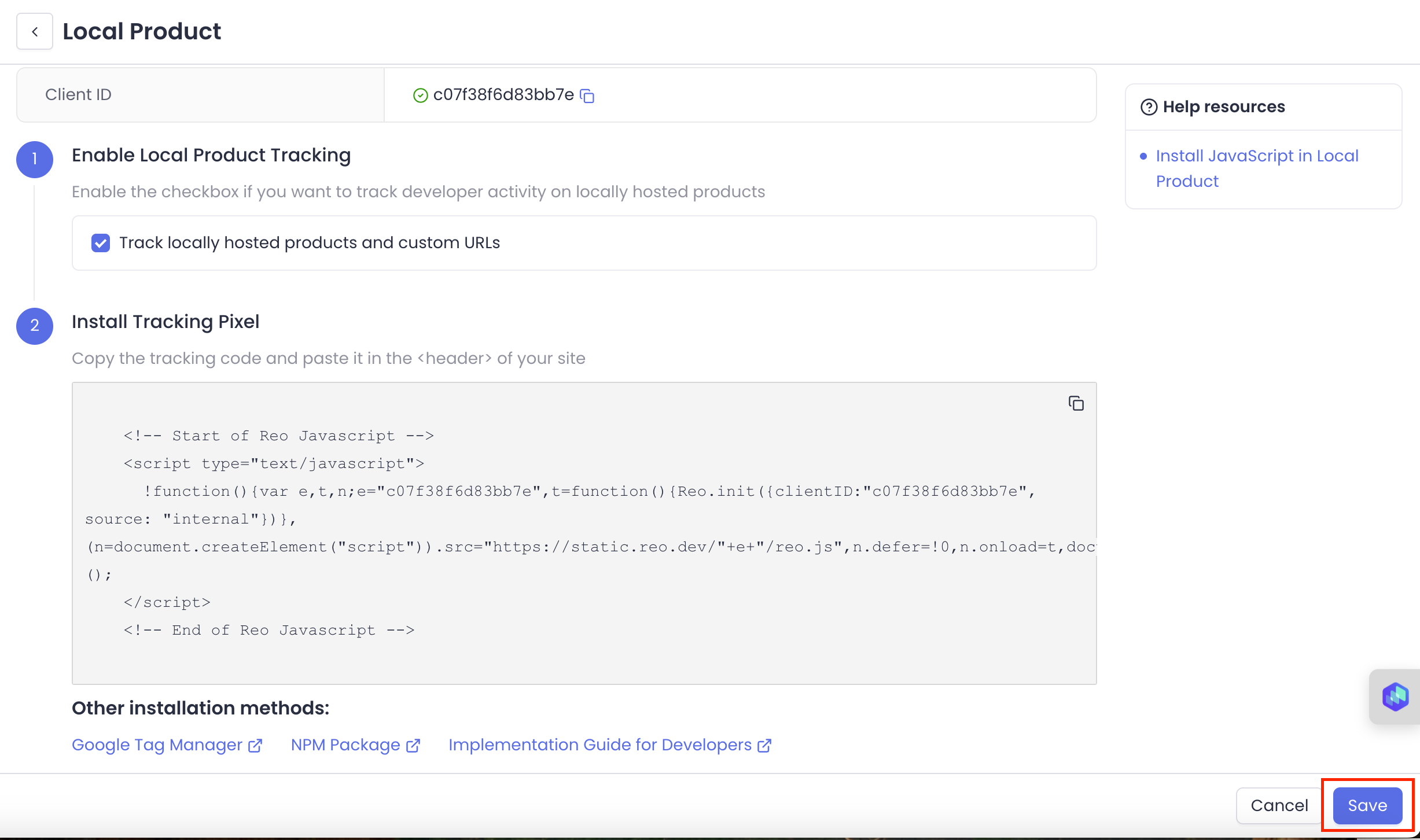
With Reo.Dev you can track developer activity on all your locally hosted products. Here's a step-by-step guide on how to set it up:
***
1. Go to **Integrations** under Settings
2. Click on **Configure** in the Local Product card
#### **Step 1: Enable Local Product Tracking**
Click on the ‘Track locally hosted products and custom URLs’ checkbox to enable tracking on your locally hosted products.
#### **Step 2: Install Tracking Pixel**
Copy the tracking code snippet directly from Reo's UI and paste it in the \ of your site
```jsx
```
Here are few more ways you can install JavaScript on documentation pages:
1. Using Google Tag Manager. [Here’s the setup guide.](https://docs.reo.dev/integrations/tracking-beacon/install-javascript-for-website-documentation-through-google-tag-manager#for-documentation-tracking-via-gtm)
2. Using NPM Package. [Here’s the setup guide.](https://docs.reo.dev/integrations/tracking-beacon/install-javascript-for-website-documentation-through-google-tag-manager#for-documentation-tracking-via-gtm)
Once done, click on **‘Save’** to start tracking developer activity
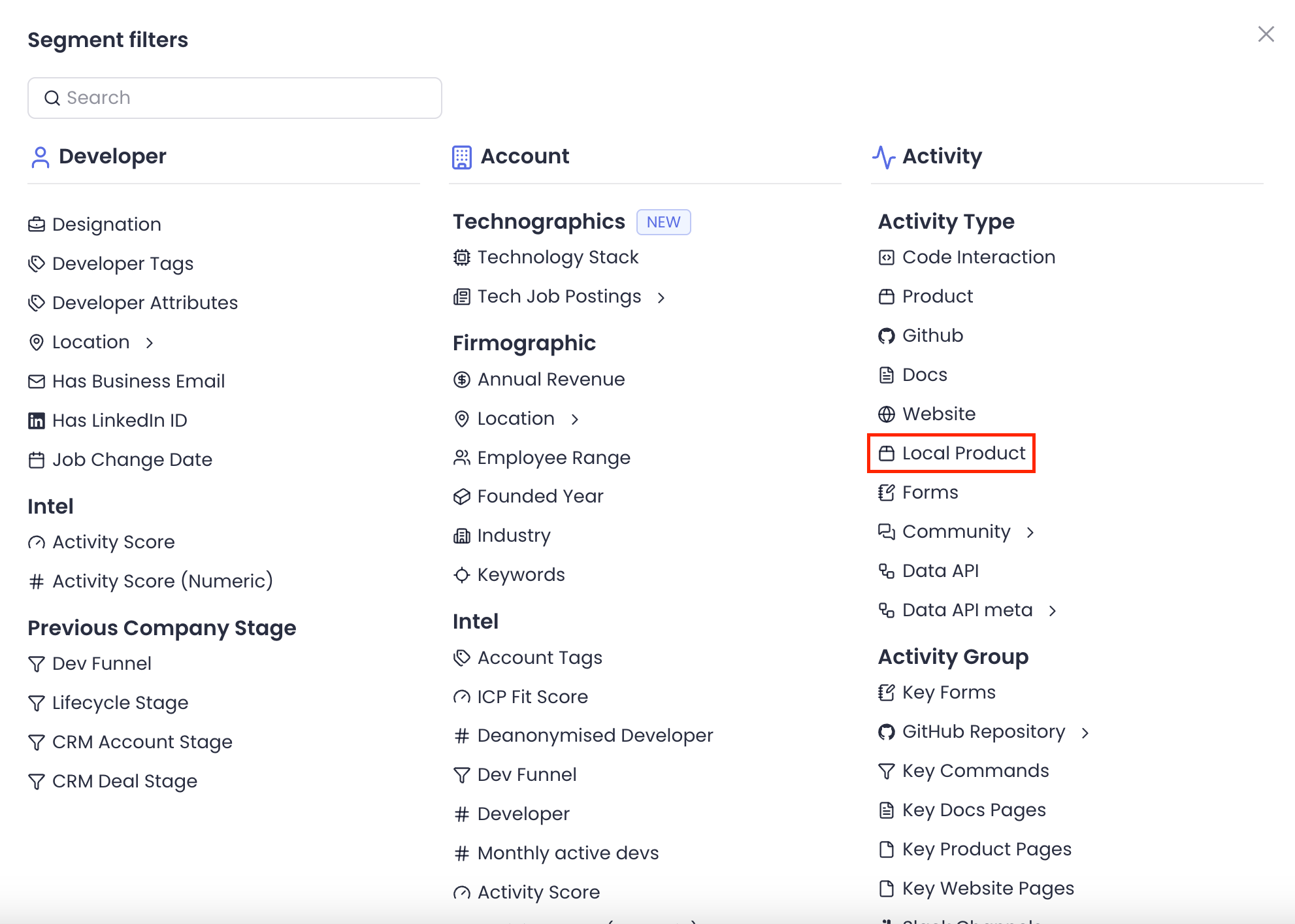
Once you've added the JS, you can **create a Segment** to see accounts/developers/buyers interacting with your local product. Use filter '**Local Product'** from the Segment filter list.
Then, select the specific activities you want to track from the Segment Criteria attribute
For any account - you can filter the activity timeline based on the local product filter and see which developers have interacted with your local product, how often they've engaged, and gain valuable insights to tailor your messaging effectively.
{% hint style="info" %}
**Note:** Key Pages aren’t supported on local hosted products.
{% endhint %}
#### **Content Security Policy (CSP) Considerations**
If your website uses a strict Content Security Policy (CSP), you may need to update it to allow our script to load and execute correctly. Please ensure the following directives are updated to include our domains:
**Required CSP Directives**
```
script-srchttps://static.reo.dev;connect-srchttps://api.reo.dev;
```
### FAQs Does the JavaScript code introduce any vulnerabilities or risks to the website?
The JavaScript code has been tested thoroughly to ensure that it does not introduce any vulnerabilities or risks to the website. Data sent by the JavaScript code is encrypted using the HTTPS protocol to ensure secure transmission and prevent unauthorized access.
Does the JavaScript code use external dependencies or third-party libraries?
The JavaScript code uses secure third-party libraries that have been thoroughly checked for vulnerabilities and risks.
How does JavaScript handle user privacy? Is there a potential risk of collecting personally identifiable information (PII) without proper consent?
It is designed to collect anonymous data such as browser information, page views, copy and click events without collecting any non-consented PII.
What impact will including this JavaScript have on the page load times of my app?
The code has been optimized to minimize any negative impact on page load time and performance. This code uses asynchronous loading technology so it can load independently without blocking the rendering of the screen content.
Has the JavaScript been tested on different browsers and devices to ensure cross-platform compatibility and consistent behavior?
The JavaScript code is thoroughly tested on multiple browsers (Chrome, Firefox, Safari, Edge, Brave) and devices (desktop, mobile) to ensure compatibility and consistent behavior.
Will the inclusion of this JavaScript affect the overall user experience of the product, for example, slow down UI interactions or cause unexpected behavior?
It doesn't affect the overall user experience. It will not slow down, or introduce any intrusive elements that have an impact on the experience.
Are there any fail-safe mechanisms in place to prevent scripts from disrupting critical functionality in the event of an error?
We have implemented fail-safe mechanisms in the javascript to prevent scripts from interrupting the website's critical functionality in the event of an error, thus ensuring a smooth user experience.
Will the JavaScript code continue to perform optimally as the app traffic and user base increase over time?
The code is optimized for scalability. The JavaScript code is designed to scale as your online traffic and user base grow. It will continue to work best even as traffic to your site increases. There are no significant limitations or performance bottlenecks associated with the tracking mechanism.
---
# Agent Instructions
This documentation is published with GitBook. GitBook is the documentation platform designed so that both humans and AI agents can read, navigate, and reason over technical content effectively. Learn more at gitbook.com.
## Querying This Documentation
If you need additional information that is not directly available in this page, you can query the documentation by asking a question.
Perform an HTTP GET request on the following URL with the `ask` and `goal` query parameters:
```
GET https://docs.reo.dev/integrations/input-sources/developer-insights/local-product.md?ask=&goal=
```
`ask` is the immediate question: it should be specific, self-contained, and written in natural language.
`goal` is what the user is ultimately trying to achieve, the reason they need the answer. Sharing it helps GitBook give you a better, more relevant answer. A goal is most helpful when it describes the outcome the user wants rather than restating the question. For example, with `ask=how do I create an API token`, a goal like `automate deployments from our CI pipeline` lets GitBook tailor the answer to that use case.
The response will contain a direct answer to the question and relevant excerpts and sources from the documentation.
Use this mechanism when the answer is not explicitly present in the current page, you need clarification or additional context, or you want to retrieve related documentation sections.