> For the complete documentation index, see [llms.txt](https://docs.reo.dev/llms.txt). Markdown versions of documentation pages are available by appending `.md` to page URLs; this page is available as [Markdown](https://docs.reo.dev/integrations/input-sources/developer-insights/cloud-product.md).
# Cloud Product
You can track developers who access your cloud product to analyze their interactions on the product.
1. Start by clicking on **'Integrations'**
2. Then, click on **'Configure'** in the Cloud Product card
#### **Step 1: Configure Cloud Product URL**
1. **Add the Cloud Product URLs** you want to track in the Cloud Product URL field. You can choose to add multiple cloud instances of your product.
2. **Add a Page Name** for every domain under the Page Name field
Once added, you can create a Segment to view accounts/developers/buyers interacting with your product.The page name will appear under the ‘**Key Product Pages’** filter while creating segments.
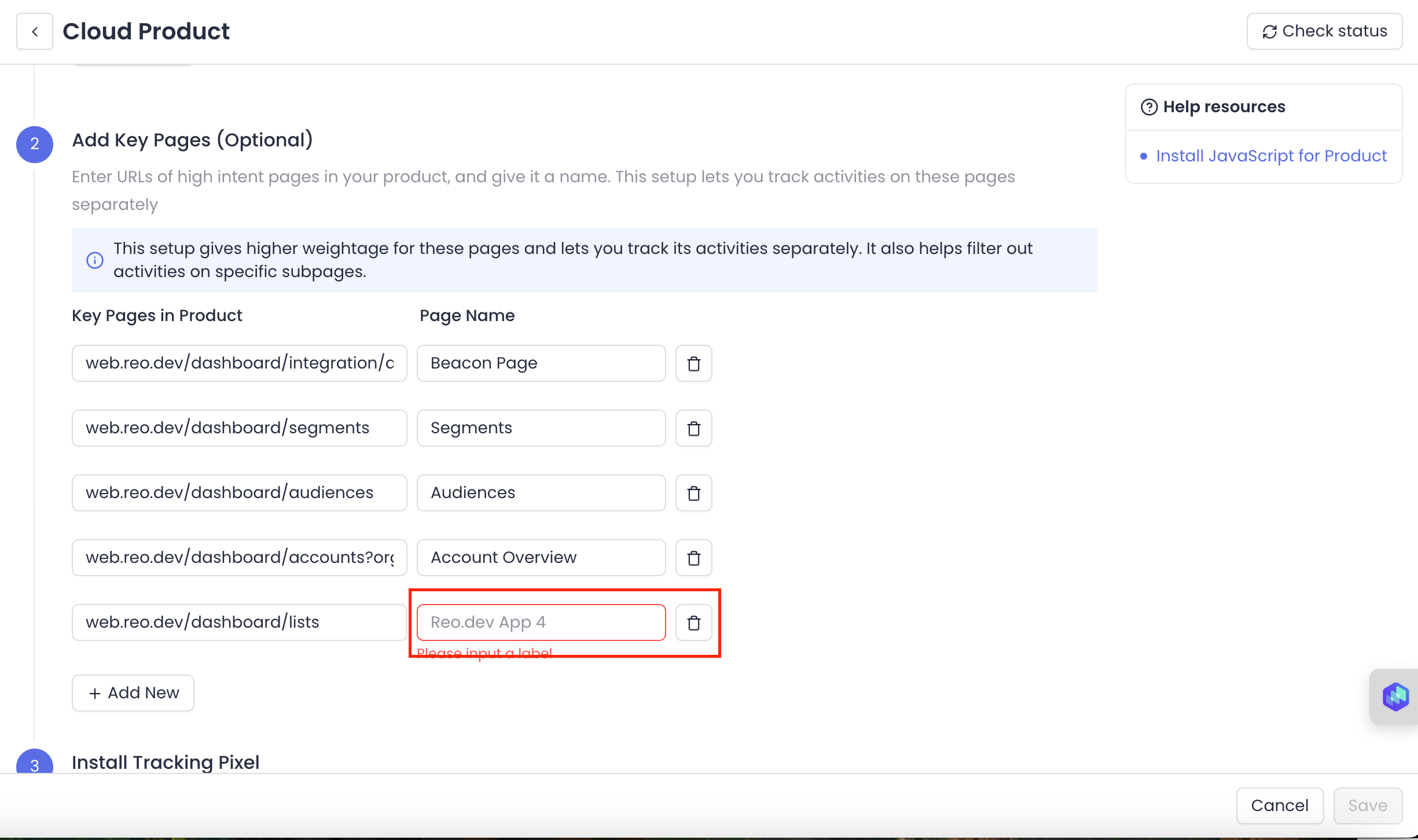
#### **Step 2: Add Key Pages**
This is an optional step. But we highly recommend this. Some pages within your product signal **high user intent**—indicating that users are actively engaging with or setting up your tool. Tracking these **Key Pages** helps you identify accounts showing high intent.
For example:
* **Dashboard settings or integrations** – Users configuring integrations might indicate onboarding progress.
* **Account & Subscription pages** – Frequent visits to billing or account management suggest decision-making.
* **API Access or Authentication pages** – Developers generating API tokens signal deeper product adoption.
To add the key pages:
1. **Add URLs of specific pages/sections** in your product you want to track activities on.
2. **Add a Page Name** for each URL
**Tracking dynamic URLs with wildcards**
If your URLs include dynamic segments — like a project ID or org name — you can track them as a single Key Page by using `*` as a wildcard in place of the dynamic part.
For example, to track the journeys page across every project - you can set up the URL as `/project/*/journeys`
Reo will capture all URLs matching this pattern, no matter what sits in place of the `*`. To set this up:
1. Add the Key Page URL with `*` as the wildcard for the dynamic part
2. Hit Save — Reo will start tracking all URLs that match the pattern
**Note:**
* Wildcards mid-URL (like [`abc.com/id/*/orgpage`](http://abc.com/id/*/orgpage)) are supported
* A trailing wildcard like `abc.com/page/*` isn't needed. Reo automatically captures everything after the last `/`, so it's redundant.
You can create a Segment to see accounts/developers/buyers interacting with specific Key Pages. The page name will appear under ‘**Key Product Pages’** filter \*\*\*\*while creating segments.
#### Step 3: Install Tracking Pixel
Copy the tracking code snippet directly from Reo's UI and paste it in the \ of your site. Replace "XXXXXXXXXXX" with the client ID.
{% code overflow="wrap" %}
```jsx
```
{% endcode %}
Note: Here are a few more ways you can install Javascript on your cloud instance:
1. Using Google Tag Manager. [Here’s the setup guide.](https://docs.reo.dev/integrations/tracking-beacon/install-javascript-for-website-documentation-through-google-tag-manager#for-documentation-tracking-via-gtm)
2. Using NPM Package. [Here’s the setup guide.](https://docs.reo.dev/integrations/tracking-beacon/install-javascript-for-website-documentation-through-google-tag-manager#for-documentation-tracking-via-gtm)
#### **Step 4: Invoke Sign-in Event**
This is an essential step to track product logins.
Sign-in flows can be in-house, using a 3rd party or IDP based. Hence we have exposed an event which needs to be invoked in the call-back of your successful sign-in with appropriate payload.
The **payload for sign-in needs to contain two mandatory attributes *****username***** and *****type*****.** Invoke **`identify` method to send sign-in details** which basically tells Reo who the user is and that they have logged in.
```jsx
//Prepare the payload post successful login.
const identity = {
"username": "johndoe@microsoft.com",
"type": "email", // primary identifier to be email
"other_identities": [
{
"username": "johndoe83",
"type": "github" // other identifiers can be github, linkedin
}
],
"firstname": "John",
"lastname": "Doe",
"company": "microsoft.com" // company domain
}
Reo && Reo.identify(identity);
```
**In case of use with NPM, we need to resolve the promise before we can invoke `identify` method on it. Make sure to initialise the snippet using `Reo.init` before using `Reo.identify`**
{% hint style="info" %}
Note:
* In terms of preference, we recommend using Email, Github, LinkedIn *(in that order)* handle as `username` and corresponding `type:'email'` ,`type:'github'` or `type: 'linkedin'` as the primary identifier due to declining enrichment rates. If we receive multiple identifiers from IDP, we can accommodate other identifiers in the `other_identities` field.
* We need to invoke `identify` method on every successful login
{% endhint %}
Once Done, click on Save.
Once you’ve set up the entire integration, click on Check status to see if all the URLs are connected.
#### **Error Scenarios**
* **Script initiation**
Script initiation has been modified to rely on code initiation only on successful callback post download from CDN. So it will only initiate if successfully downloaded. In case the download fails, the javascript won’t get enabled but this eliminates the likelihood of an error scenario of page breaking
* **API failure on token delete**
On deletion of **all** Reo tokens, the most recent event tracking data will likely fail, but subsequent API calls will work fine
* **Any inadvertent code failure on JavaScript**
This should not be an issue since the code is wrapped in a try-catch block, the console may throw errors, which won’t be visible even on the console since logger would be disabled on the script
**Cookie Management and Compliance**
To learn more about Reo.Dev's cookie usage, categorization, and best practices for implementation, refer to this [guide.](https://docs.reo.dev/integrations/tracking-beacon/reo.dev-javascript-cookies-and-consent-guide)
#### **Important to Note:**
By default, we track copy commands in your product environment. This is needed so that you can learn which of your logged in prospects (e.g. free users/ trial users) are showing high intent activities such as copy pasting code blocks or executing CLIs, which are a great proxy to learn their evaluation maturity and intent. We take multiple measures to ensure no sensitive information is captured or stored:
* A locally deployed AI model automatically identifies and skips sensitive information such as passwords, API keys, and card numbers, ensuring we skip as much of sensitive information as possible.
* Additionally, since the AI model can make mistakes, all captured data, including emails and copied text, is encrypted in our database. Decryption is handled via a tenant hash stored in a remote cloud vault, accessible only where applicableAll captured data, including emails and copied text, is encrypted in our database. Decryption is handled via a tenant hash stored in a remote cloud vault, accessible only where applicable.
To disable tracking for copy commands - use the `dnt` track flag. Copy the tracking code snippet below:
{% code overflow="wrap" %}
```jsx